Reports & Labels
Professional documentation for your graded cards. Display, share, and sell with confidence.
Privacy & Security
Only the original grader of a card can download reports and labels. This protects the integrity of your grades and ensures documentation remains tied to verified ownership.
Foldable Slab Label
Avery Label Template 6871
Perfect for Magnetic One-Touch Slabs
Our print-ready label is specifically designed to fit and fold over the top of magnetic one-touch slabs, giving your cards a professional graded appearance for display or sale.
Label Features:
- Card identification: Name, set, year, and card number
- DCM grade: Prominently displayed numerical grade
- Condition label: Gem Mint, Mint, Near Mint, etc.
- Serial number: Unique identifier for verification
- QR code: Links directly to the card's grading page
Pro Tip: Use Avery 6871 labels for best results. The label folds over the top edge of your one-touch, creating a clean, professional look that rivals traditional grading company slabs.
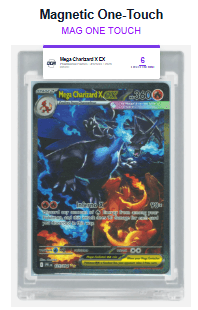
Actual DCM label on magnetic one-touch slab
Graded Card Slab
Digital Slab Image
Professional Slab-Style Presentation
The graded card slab generates a high-resolution digital image of your card enclosed in a professional DCM slab design. Use it for online listings, social media, or anywhere you want to showcase your card with its authenticated grade.
Slab Features:
- Modern slab design: Clean, professional aesthetic that rivals traditional grading companies
- Card details header: Name, set, attributes, year, and serial number
- Prominent grade badge: Large, color-coded grade with condition label
- High-resolution download: Perfect for marketplace listings and social sharing
Ideal Uses:
- • Upload to eBay, Mercari, or marketplace listings as a product image
- • Share on social media to showcase your collection
- • Use as a visual reference when selling or trading cards
- • Present a professional graded appearance without physical encapsulation
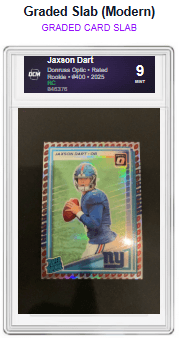
DCM graded card slab - modern design
Top Loader Label
Printable Front & Back Labels
Grade Your Top Loaders
Turn any standard top loader into a professionally labeled graded card. Our top loader labels attach to the top edge of your top loader, displaying your DCM grade and card details in a clean, compact format.
Label Features:
- Front & back labels: Complete labeling for both sides of the top loader
- Card identification: Name, set, year, and card number
- Grade display: Clear numerical grade with color-coded badge
- DCM serial number: Unique identifier for verification
Pro Tip: Top loader labels are a cost-effective way to give your cards a graded appearance for display, card shows, or sales. They work with any standard 3" x 4" top loader.
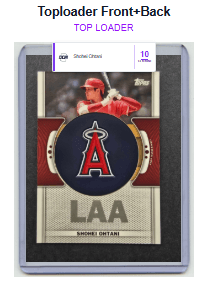
DCM label on standard top loader
Label Studio
Customize Your Labels
Make Your Labels Your Own
Label Studio gives you full control over how your graded card labels look. Accessible from any card's detail page, Label Studio lets you preview and customize your labels in real time before downloading.
Label Type Selection
Switch between Graded Card Slab, Magnetic One-Touch, and Top Loader formats to find the perfect fit for your holder.
Card Details Editing
Edit the card name, set, year, card number, and other details displayed on the label to ensure accuracy.
Style Customization
Choose from different label styles, color schemes, and emblem preferences to match your personal brand.
Live Preview
See exactly how your label will look as you make changes — what you see is what you get.
Instant Download
Download your customized label as a high-resolution image, ready to print or share online.
Batch Labels
Generate labels for multiple cards at once from your collection page using batch download.
How to access: Open any graded card from your collection and look for the Label Studio button in the Reports & Labels section. Customize, preview, and download — all in one place.
Full Grading Report
Comprehensive One-Page PDF
Complete Card Documentation
The full grading report summarizes all card grading details onto a professional one-page printout. Perfect for providing to buyers as proof of card quality or keeping with your collection records.
Report Includes:
- Front & back images: High-quality photos of your card
- Detailed subgrades: Centering, corners, edges, and surface scores
- Condition analysis: Written assessment of each grading category
- Professional grade estimates: PSA, BGS, SGC, and CGC comparisons
- QR verification: Scannable code linking to online record
Ideal Uses:
- • Include with cards sold online or in-person
- • Document collection for insurance purposes
- • Provide proof of condition to potential buyers
- • Keep detailed records of your collection
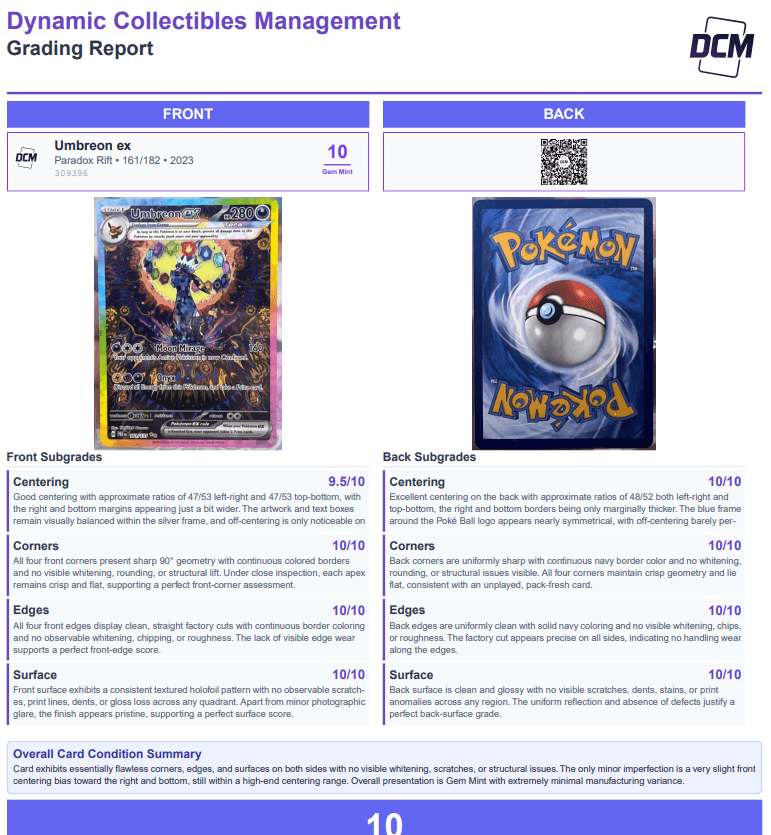
Actual DCM full grading report
Mini Report
Versatile Compact Format
Multiple Display Options
The mini report is designed for maximum versatility. Whether you're displaying cards physically or selling online, this compact format delivers essential grading information at a glance.
Three Ways to Use:
1. Folding Display Stand
Fold the mini report to stand upright beside your physical card. Perfect for showcases, display cases, or card shows where you want grade information visible.
2. Top Loader Insert
Cut out and slide behind your card in a top loader. Buyers can see the grade information right alongside the card without removing it from protection.
3. Digital Image for Online Sales
Download the mini report as an image and upload directly to eBay, Mercari, Facebook Marketplace, or any platform where card images can be shared. Instantly communicate card quality to buyers.
Mini Report Features:
- Card grade: Clear, prominent grade display
- Serial number: Unique identifier for authenticity
- QR code: Easy verification by scanning
- Compact design: All essentials in minimal space
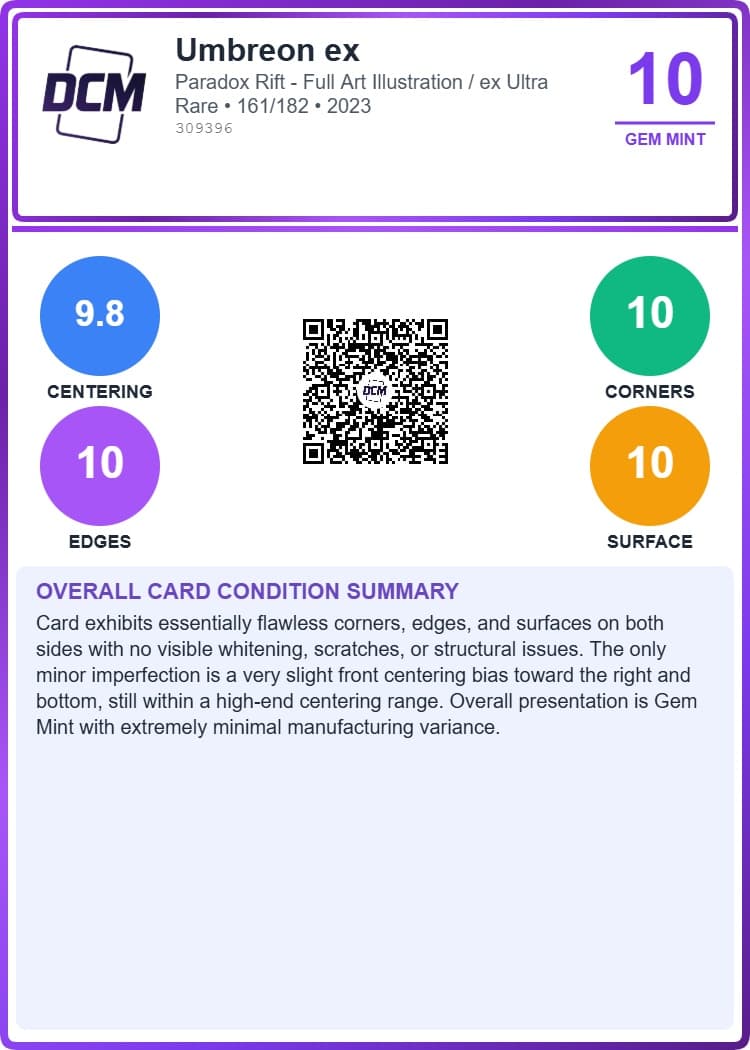
Actual DCM mini report - perfect for online listings
How to Access Your Reports & Labels
Grade Your Card
Upload your card images and receive your DCM Optic™ grade within minutes.
View Card Details
Navigate to your card's detail page from your collection or the grading results.
Download & Print
Find the Reports & Labels section and download your preferred format instantly.